
Stop the Coronavirus Corporate Coup. I’ve got a bad feeling about this.
The aerospace giant of course wants a $60 billion bailout. Financial problems for this corporation predated the crisis, with the mismanagement that led to the 737 Max as well as defense and space products that don’t work (I noted last July a bailout was coming). The corporation paid out $65 billion in stock buybacks and dividends over the last ten years, and it was drawing down credit lines before this crisis hit. It is highly politically connected; the board of the corporation includes Caroline Kennedy, Ronald Reagan’s Chief of Staff Ken Duberstein, three Fortune 100 CEOs, a former US Trade Representative, and two Admirals, one of whom is the board’s only engineer. Using the excuse of the coronavirus, Boeing is trying to get the taxpayer to foot the bill for its errors, so it can go back to making more of them.
The jazz icon Sonny Rollins knows life is a solo trip. Seems like a surprisingly wise, grounded performer.
Keep in touch with friends, the littlest CRM that could
This year, I’m trying to better keep in touch with friends, family, and former co-workers. It came to my attention that this is, in many ways, a thing for which you would use a customer-relationship management application. This could work, but seems like a lot to me.
Most software starts life as a) a document/spreadsheet or b) a system of long email threads. In that spirit, I thought I might work backwards from what I normally do: build the littlest CRM I can without writing code or using development tools.
I’ve already got Things and Bear in my workflow. Turns out that duo solves the essential part of the problem. Things reminds me to contact a friend/family/co-worker periodically. I keep notes on what folks are up to, what we talked about, when the last time we talked, etc. as unstructured notes in Bear.
That’s it! I’m only one month into this experiment, but I’ve contacted, at least once, most folks I wanted to. 📈
Enforce system consistency at the boundaries & meditations on run-time type systems
(…continuing a Twitter thread)
io-ts caught my attention a while back and I finally had the chance to read through it. I’m glad folks are experimenting in this area, particularly with the potential reach into multiple communities and ecosystems that TypeScript affords.
We use dry-rb extensively at work and I was curious how a TypeScript expression of the same idea (define type-like structures at your runtime boundaries) looks.
The flippant response to runtime type systems for dynamic languages is: if you love types so much, why aren’t you using Haskell, Scala, Swift, etc.? That is, a type system over JavaScript or Ruby is a relatively new/unconventional choice.
Gradual type checkers: it works for Facebook and Stripe. Maybe it scales down for much smaller teams and codebases? Weird flex, but okay.
In reality, a runtime type system is easy to adopt and, when paired with some kind of Either/Result abstraction, can be built incrementally by composing types, data coercions to types, and validations of coerced data.
Having spent a year and change working with dry-rb’s runtime types/validations, I’m looking forward to introducing Sorbet. I like the idea of writing types and function signatures for development-time enforcement, but having the option to use some of them at runtime for boundary enforcement.
dry-rb has served us well, but the development experience that I crafted is highly coupled to using a Result/monad-ish idiom. Lots of combinator-envy. Most developers don’t crave this sort of thing.
Even if it’s successfully sold, it’s an uphill battle of education and FP/OO adaptation the whole way. If I were doing it over I’d look to Go’s tedious but easy to teach idiom of checking for errors after nearly every non-trivial operation.
I think dry-rb and io-ts will succeed or fail in very similar ways. Teams that know an ML-like language but are for some reason using JS or Ruby will take quickly to it. Otherwise, there’s an impedance mismatch to manage as they teams their own idioms on top of runtime types.
I’d pitch this to front-end developers as similar to React’s PropTypes, but better.
PropTypes give you greater confidence that you’re passing the right properties to a component and that a refactoring didn’t break things. Type-asserting data structures, like io-ts, give you confidence that the boundaries of your system, e.g. the XHR request/responses and persisting data to local storage, are either well-formed or immediately kick over to failure handling.
Enforcing object shapes (keys and nesting), type correctness (the value for key X is type Y), and validity (values declared as an “age” are always positive integers) at the boundary of your application and between components means you can more code on the “happy path” in your application logic. Conditionals and error handling are largely, but not entirely, pushed outwards to prop types or the boundary type system. This is, in my opinion, living the dream!
The gift and the curse of io-ts and dry-rb’s design is the use of combinators as the center of their design.
The skill ceiling for composing functions to handle network/database requests, type/shape assertions, coercions, and validations is very high. There’s lots to learn about combinators and the more you know, the more you can do. The downside is that the skill floor is also high. The less you know about combinators, the more mysterious, intimidating, and math-y they are.
It’s an unfortunate reality that developers rarely rave about how great a library or language’s error model is. Mostly people put up with exception handling and try to live in a blissful world of error-avoidance and happy paths.
Result types - e.g. Rust’s Result, io-ts’ Either, Haskell’s monads, dry-rb’s Result and monads, Elm’s Result and Maybe - are promising. Function return types that are explicit about whether the thing succeeded or failed (without stack manipulation hijinks) is something we really should have put in practice some time ago. io-ts and dry-rb are existence proofs, to me, that you don’t need an extremely sophisticated type system to make these work in practical, runtime-typed languages like Python, Ruby, or JavaScript. But they can quickly send you down the road of combinators. I’ve found this is not a road developers are enthusiastic about traveling.
Go and Erlang take a different, utterly unsophisticated, road and I wonder if it’s more promising. Functions that can fail (any kind of IO, some kinds of math, etc.) return a success value and error value as an array or tuple. Developers are expected to always check for an error before proceeding; linters and peers will complain if you don’t.
If a linter does it, so can a compiler or gradual type system can too. Maybe the middle ground between the status quo of exceptions and the promised land of result types is compiler-enforced checking of success/error pairs. The advantage is, no invention or re-learning is needed. It’s an array and a conditional. Granted, I’d prefer to get rid of the conditional. But, I’ll take the ease of training developers on the approach as a trade-off.
In short: my new hypothesis is “run-time enforcement of types/values/rules around the boundaries of your system, gradual/static types inside your system to prevent programmer errors”. If you can go further and use a static type system like Rust or Elm to reach the point your software is “correct by design”, that seems like living the mega-dream. 🌈
The Beautiful Ones
Prince’s unfinished memoir, The Beautiful Ones is a quick, but awkward, read. The preface is the most coherent, the story of how the editor, Dan Piepenbring, ended up being chosen by Prince to realize his autobiography. It shines an interesting light onto what it was like to be in Prince’s orbit, if only briefly.
Of course, Prince passed away shortly after the book was announced. He had started providing material to his writer in the form of notes and guidance, but only a few chapters worth covering his youth and early career. These notes, in their idiomatic manner of writing, e.g. “👁️ love u”, form the bulk of the book. The rest of the material are photographs and other notes collected with the help of Prince’s estate. They’re insightful, but not particularly coherent.
I’m relatively new to the deep Prince mythology. I suspect I got more out of the book than those already steeped in purple mystery would. There are probably better starting points for those who want to know everything about Prince or who are enitrely new to the Prince mythos.
I watched the various Watchmen
I just finished reading the Watchmen graphic novel and it is amazing. I was drawn in by the HBO series last year, which amplified my enjoyment of the original story. It might end up in my top five works of fiction.
The story is of its time: the Cold War, superheroes as saviors. Even better, it has timeless themes that feel relevant in our weird contemporary situation: growing authoritarianism and nihilism towards overcoming the status quo to tackle other looming problems.
I saw the Watchmen movie first, several years ago. The movie, as I remember it, holds to the first few issues surprisingly well. The ending of the comic is far superior to the one used in the movie. The comic has more space to expand minor storylines and even introduce a whole other comic within the graphic novel. The comic stands head and shoulders above the movie.
I still feel like the Watchmen HBO series was one of, if not singularly, the best shows on television/streaming last year. The graphic novel is the perfect chaser. Lots of plot points make more sense through the lens of the graphic novel: the whole squid attack, Looking Glass being slightly off, Robert Redford as president.
If it turns out they don’t produce more seasons in the HBO series timeline, at least there will always be the comic. (And Westworld, for the time being).
Get a cute credit card and overtip
Highly recommend: get a BB-8 or similarly lovely icon from your favorite mythology on the credit/debit card you most frequently use. I have a couple lovely bonus conversations with folks per week because of it. Sometimes it's "like your card" but sometimes it's full "did you see the latest thing?" and it's nice to talk to people outside my normal routines.
Of note, I get as many comments about BB-8 on my card in a week as I did for Darth Vader in a month. QED the fandom is wrong, bring more fun stuff and less super-serious Skywalker stuff. And don't be cowards, let Chewbacca and Maz resolve their romantic tension!
ps. tip everyone you can until our country’s terrible treatment of people in service jobs improves. They work hard, get paid too little, have basically zero safety net, and serve on the front lines of the "may I speak with the manager" wars.
Keep waterfall out of your agile
An insightful thing my pal Brandon Hays observed is that teams introduce little bits of waterfall into their agile processes when they get burned by scope expansion, bugs, infrastrucure, and such.
Unblocking oneself
Succeeding and thriving at remote work is largely about getting very good at asynchronous (Slack, discussion threads, email, etc.) and nearly-asynchronous (phone calls, video meetings, screen sharing) communication.
Productivity in remote work is often bottlenecked by the availability of teammates for near-asynchronous collaboration.
Therefore: boost your productivity as a remote team member by writing up context and questions your teammates can think through and help with when they’re available to collaborate. Then, pick up another task to make progress on in the meantime.
Sharing context in code review
A nice guide on code reviews (unfortunately no author is attributed on the Notion doc) is making the rounds. If you do code reviews, you should read it. If you don’t, you should start, and then read it.
I do have a personal quibble with this particular guide. I find code review most valuable for “education and context sharing”. I rarely detect bugs or “safety” issues when reading PRs. I’m trying to build this skill, so maybe check back with me later on that.
On the flip side, I want to boost a couple ideas that I wish had been in force for code reviews I’ve given/received in the past:
- “No stylistic preferences” enforced by humans. This is indeed what linters and style guides are for. If you object to the use of linters, I can’t help you.
- “No blocking tips”. Lately I’ve tried leaving comments that start with “not a blocker…” followed by an idea on how to make code clearer. This gives the code author the option to address it immediately if they have the gumption, return to it later if they don’t, or take it under consideration for the future.
- “Any PR that introduces…a security or privacy issue should be blocked”, in particular user privacy/safety issues. I’m lucky to work on a team that is considering user safety and data privacy very early in the process, so we often don’t come across these issues as late as code review. That said, expanding code review scrutiny to include ways that customer data could be leaked or people could act maliciously feels like a cultural win.
Lastly, this whole paragraph hits home. Onboarding and “mind-melding” is possibly the second most important thing to keep in mind regarding code review in the year 2020:
Nobody went to school for hacking on your company’s stack. Outside of software fundamentals all of us had to learn how to make things work while on the job. Code reviews are one of the best ways for us to share knowledge and context about different ways things are done or tricks we’ve figured out to get things done in better ways.
In my opinion, the most important thing to remember about code review is that it is often the worst time to offer non-trivial feedback. Most pull/change requests land when a project is wrapping up and the author is ready to ship the thing. This is the riskiest and most frustrating time to make substantial changes. If you want to improve code design and practice, pair programming is the better tool, not code review.
Reading massive tomes: less slog, more joy
I’m drawn to expansive views on a subject. Sprawling narratives are irresistible. Giant books are my weakness. It’s rewarding to finish a chunky, 500-page book but getting there is quite the chore. The more pressing problem is, there are far more tomes out there than I can ever read.
Previously, my strategy for reading large non-fiction tomes has been to 1) slog through them or 2) let them sit around making me feel guilty. Instead of accruing a backlog, I’m looking for opportunities to get the essence of longer books with a smaller investment of time and energy.
Thus, I’ve organized my ideas into a 2x2 diagram to how I’m making tradeoffs and deciding which books to read this year:
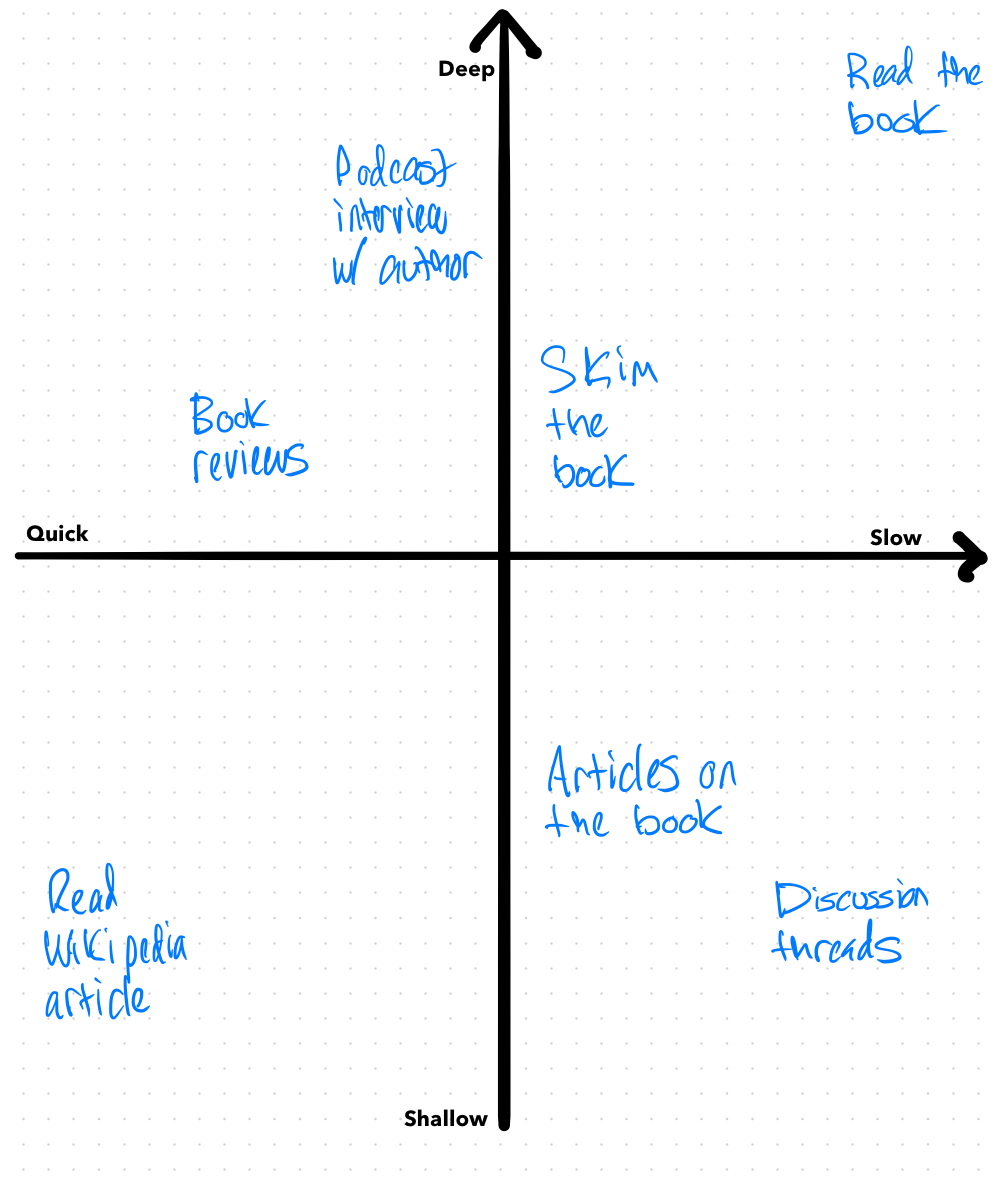
Read more about Reading massive tomes: less slog, more joy →
Little victories amongst the bigger vision
A couple of my favorite Ruby friends mentioned that they’re trying to keep their side projects small. Despite that very practical aspiration, the siren call of larger projects still beckons. We know the pragmatic step is to find the little projects inside the big projects and share/ship those.
And yet…it’s easy to fall back into big projects, forgetting to show progress. So here I am, showing a little bit of progress! 🤞
...
Here's a behind-the-scenes look: I wrote this months ago, when I was trying to get back to consistently blogging. It was my the little push to get the habit started again.
The astute amongst have noticed that I've been somewhat consistent for the past few weeks. But I'm about to jaunt off for a few days of vacation and I didn't want to let my progress reset to zero. So I dug this post back up and here we are. Repurposed for a good purpose.
I'm still here, showing progress. Finding the little victories amongst the bigger vision. Keeping the candle lit, per se. As it turns out, if perfect is the enemy of good, skipping your blogs because you're going on vacation is the enemy of sticking with the habit of blogging. 📈
When management clicks
As a manager, I hear about things that are interesting and things that probably need changing.
“We want to do three projects but only have two teams.”
“The next production release is held up by this one task that needs seven people to agree on a minor but complicated detail.”
“The backend team has to spend the next week upgrading dependencies to meet new security requirements from the operations team.”
Lots of work to do there. Eyes bigger than stomachs, weird coordination issues, past decisions piling up and haunting us all at once. Assembling these data points into a theory of how the organization works, without falling victim to us-vs-them narratives and cynicism, is an essential challenge of management.
On the other hand, I hear things that are categorically good.
“Alice has saved us a ton of work this week.”
“Bob did fantastic work on this product and we’re going to ship early.”
“Carol stepped up and coordinated everyone when the project lead had to take a few sick days.”
In my few years of leading and managing teams, these are the best kinds of things to hear. Something about people is working here. They’re turning accountability for their work into positive outcomes.
Stacking repeated positive outcomes yields trust in people and teams. That yields agency to tackle future projects in creative, potentially better ways. That usually leads to even more positive outcomes. Even more importantly, it makes for teammates who are excited and satisfied by their work.
Bringing teams together across an organization to make positive outcomes for people who are excited about their work: that’s when management feels like it is clicking.
Three (increasingly wild) bits about Prince
As unreleased material trickles out of the Prince estate, some fantastic stories have emerged. I haven’t yet read The Beautiful Ones, but even the stories that aren’t part of his incomplete autobiography are top-notch Prince mythology.
Prince hired a DJ to play music for just him and his date:
“And then it hits me,” WallyWaves writes. “There’s only two people in there. Prince and a girl. I’m not there to DJ a private party. I’m there to DJ a date. Prince is on a date and I’m the entertainment.”
Prince shopping before Tower Records opened:
Mike: "How do you want to pay for this? Would you like us to ring it up now?"
Prince: (smiles)
Jerome: "Yeah, talk to THIS dude, here's his number, he'll handle it." (hands us digits for the President of Warner Bros. Records)
Finally, for all your conversational and expressive needs, an Official Prince GIF Archive.

Contracts made older objects better
Developers love contracts, i.e. types and type systems. Except, and especially, when they don’t. Contracts tell us, this module has a few functions and they definitely take these inputs and produce these outputs. Some languages (Haskell, Elm) even encode the possible side-effects of calling a function in the types. Contracts place useful, and sometimes comforting, constraints on the relationship between two bits of code.
A consequence of software eating the world is real-world contracts became weaker. Physical objects no longer have the constraints that made them special before.
That fancy car you bought might mix artificial engine sounds in with whatever’s playing on your speakers. It may also collect data on where you’re going, upload it through a cellular data connection you’re not even paying for, and sell it for “marketing”. All of this a departure from what was previously considered the “contract” for a high-end car.
That porch camera an e-commerce giant sold you so people don’t steal packages off your porch may also be accessible to their customer support. Or, the police. Again, a departure from the contract most of us grew up with for household electronics.
That book you bought might get “turned off” if it’s no longer a good business for the vendor. It might get changed if words in it were wrong or politically inconvenient. You guessed it, not quite the contract most of us expect from a bag of words.
That computer-enhanced movie you went to see might get revamped wholesale because the teeth are creepy, a human hand where a cat's paw should be was overlooked, or because people were having too much of a laugh about the whole movie. Notably, this is not Martin Scorcese’s vision of what cinema should be.
Before they were software it was natural that cars, books, appliances, vinyl, etc. had better contracts:
To understand why books are still around, and why they delight as they do, we need to do some “media accounting” — What are the costs (individually, socially) of engaging with certain media and mediums, apps and publications?
Stab a Book, the Book Won't Die - Craig Mod
Understanding the contracts into which we enter with media helps demystify why physical books (and, similarly, vinyl, analog film, et cetera) not only remain compelling, but become more compelling the more their digital twins grow vast and fuzzy.
The software we’re building today is in almost every way superior to the immutable objects we created before. But I can’t help think that the constraints that make a copy of Cat’s Cradle, The White Album, an Omega watch, or a Porsche 911 special might make software better as well.
Perhaps what we need is a little less change and a little more purpose.
Training & Learning
A thing I’ve learned from weightlifting (also from Destiny, but that’s a whole other thing), is the value of showing up several times a week and putting in the right kind of work.
Learning is training, and the quality of your reps is important. David Perell makes the connection better than I could:
Athletes train. Musicians train. Performers train. But knowledge workers don’t.
Knowledge workers should train like LeBron, and implement strict “learning plans.” To be sure, intellectual life is different from basketball. Success is harder to measure and the metrics for improvement aren’t quite as clear. Even then, there’s a lot to learn from the way top athletes train. They are clear in their objectives and deliberate in their pursuit of improvement.Learn like an athlete
Knowledge workers should imitate them.
In short:
- Train intentionally: choose one learning project per quarter.
- Do the reps: learn every day.
- Train in public/on Instagram: write/blog/etc. about your journey.
Economist Tyler Cowen also commented and shared his routine.
My personal routine this month is: read fiction and non-fiction every day. Write or revise every day with an eye towards building up my muscle for publishing articles on this blog.
Also: floss every night. 🤷♂️
Related: applying a fitness training mindset to software development is a great way to reach “I know this”!
William Gibson in the New Yorker
How William Gibson Keeps His Science Fiction Real - I gotta read more Gibson; just as soon as I finish all the Stephenson. 🤦♂️
One of them showed him an episode of “Cops,” the pioneering reality series in which camera crews sprinted alongside police officers as they apprehended suspects. Policing, as performance, could be monetized. He could feel the world’s [fuckedness quotient] drifting upward.
Futurists he knew had begun talking about “the Singularity”—the moment when humanity is transformed completely by technology. Gibson didn’t buy it; he aimed to represent a “half-assed Singularity”—a world transforming dramatically but haphazardly. “It doesn’t feel to me that it’s in our nature to do anything perfectly,” he said.
He spent time on eBay—the first Web site that felt to him like a real place, perhaps because it was full of other people and their junk. Through eBay, he discovered an online watch forum, and, through the forum, he developed some expertise in military watches. He learned of a warehouse in Egypt from which it was possible to procure extinct Omega components; he sourced, for the forum membership, a particular kind of watch strap, the G10, which had originally been manufactured in the nineteen-seventies and had since become obscure. (A version of it, known as the NATO strap, is now wildly popular in menswear circles.) Gibson noticed that people with access to unlimited information could develop illusions of omniscience. He got into a few political debates on the forum. He felt the F.Q. creeping upward.
Did Gibson popularize the NATO watch strap or was he just ahead of the horological time?🥁
Options everywhere
Setting roadmaps and key results feel like truthful, strategic work. But the flip side is, if you approach them at face value or don’t focus on the outcome, they reduce the ability for teams to creatively pursue different solutions in service of the desired outcome. That increases your risk of exceeding calendar/complexity budgets!
I’ve come to hate the damage the “product roadmap” metaphor does to the brains of everyone involved in developing a product. When I use an actual map of actual roads, I assume that I know where I’m going and how I’m going to get there. This is never the case when developing a product.
Kent Beck, Decisions, Decisions or Why Baskets of Options Dominate
Instead: choose shorter iterations that let you try an idea, spend a limited amount of time on it, and decide if it’s worth further pursuit. Optionality! The downside is, now you have to decide on each idea that got you closer to building the product or achieving the key result. Decision fatigue: It’s a better problem than no options! 🤷♂️
Consumers, on the other hand, love options. Buying a car, instead of e.g. a bike or using scooters and buses, is buying a bundle of options:
That’s why ditching car ownership is going to be really unattractive for a lot of people - no matter how attractive you make the alternatives. Unless you can replace all of the important jobs that a car does for you, all at once, then competing against the car means competing against free. Actually, it’s worse than that - it means competing against free and nice. Bundle economics (and also ego issues) are powerful enough that it’s pretty rare to see people downgrade their cars, even if their car requirements have gone way down (like they had kids go off to college). Once you go SUV, you don’t go back.
Alex Danco, The Car Bundle
When we’re buying cars, we are making trade-offs on money, signaling, time, practicality, wanderlust, recreation, and whatever hoops the car salesperson is putting us through. Again, decisions are fatiguing!
Taking notes on paper vs. glass in 2019
Software (currently, GoodNotes) and hardware (iPad Pro + Apple Pencil) are finally to a point where glass is competitive with paper (currently, Studio Neat Panobook, previously Baron Fig Confidant). I suspect we’re in a grey area like automatic vs. manual transmissions. Most folks won’t care and choose whichever is easier or at their disposal. A few will have very specific opinions or principles that lead their choices.
I am a man of principles and opinions.
How regressions happen
Working with software is frustrating, and working on software doubly so, because things up and break. Seemingly without warning or cause. One day the software is fine, the next day it flat-out doesn’t work. Even worse, one day it has this one bug or missing feature and the next day the bug is fixed or feature added but there’s all new bugs. What gives?